
Junwoo
2022-10-21 13:36:10
University
A firsthand review of six video editing solutions and recommendations tailored for specific purposes
🎓
Choosing the Right Video Editing Program for You
Starting offHow often do you watch YouTube these days? We live in a time where all communication hinges on video content. Can you imagine that way back in 2005 ...

🎓
Exploring the Power of ‘Content Marketing’ and How to Do It without Advertising Expenses
There once was a time when mounting an advertisement on Facebook guaranteed crazy sales with a staggering Return on Ad Spend (ROAS). With the advent of the pand...
🎓
The Perfect Blend of chatGPT and VideoStew – A Single Step Solution from Planning to Editing YouTube Shorts
The Complexity of Video CreationAccording to a 2021 survey on the state of the one-person media industry, it takes an average of 12 hours for a solo creator to ...

🎓
Mastering YouTube Shorts Sizes and Layouts: The Ultimate Guide
What Are the Pixel Dimensions for YouTube Shorts?YouTube Shorts are vertical videos under 60 seconds, a short-form media format beloved alongside TikTok and Ins...
🎓
Starting Simple with Short-Form Video Marketing Strategies
We are in the golden age of short-form videos: YouTube Shorts, Instagram Reels, TikTok and the like.According to the 2022 Short-Form Content Marketing Report pu...

🎓
A firsthand review of six video editing solutions and recommendations tailored for specific purposes
Over the past month, I've experimented with six different video editing solutions, putting each through its paces to assess their respective strengths and weakn...
🎓
[Creating Videos with Multiple Solutions] 6. Video Editing with Filmora
Continuing our series comparing key video creation solutions, our sixth and final solution is Filmora. This is a popular downloadable program among individual u...
![[Creating Videos with Multiple Solutions] 6. Video Editing with Filmora](https://cdn.videostew.com/files/thumb/d48afad7a-7dv1rytcs)
🎓
[Creating Videos with Various Solutions] 5. Video Editing with Lumen5
We are now on the fifth solution in our series comparing major video creation solutions: Lumen5, a foreign SaaS solution. Lumen5 is best known for its concept o...
![[Creating Videos with Various Solutions] 5. Video Editing with Lumen5](https://cdn.videostew.com/files/thumb/b46d6238f-7dtvp5xkb)

Over the past month, I've experimented with six different video editing solutions, putting each through its paces to assess their respective strengths and weaknesses.
First off, you can find detailed reviews of each solution below. If any of these catch your eye, I recommend giving them a gander.
All solutions, one mission: creating the same video
To thoroughly test these solutions, I established a standard by making a sample video. This video was short-form and informational. A source of knowledge you'd usually see these days. (
They do call it a knowledge video, don't they?) I then sought to recreate that video as closely as possible using each solution.<iframe src="https://www.youtube.com/embed/RVIJRKk6c6c" allowfullscreen=""></iframe>
Premiere didn't present any issues, being a tool capable of creating anything. As long as you're familiar with the basics, you can mold it to your will. However, some solutions did present clear areas of specialization, making them a tad too challenging to reproduce the same video. It's not about poor features—it’s just that each has its own focus. In such cases, I boldly abandoned the attempt to make an exact copy, directing my efforts towards achieving an effective final product instead.
A comprehensive comparative analysis
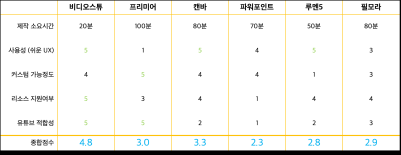
First, let’s take a glance over the strengths and weaknesses of each video production solution through a simple chart. To summarize, VideoStew was fastest in production time, taking just 20 minutes and its output quality was decent too.
From a Usability Standpoint
Usability evaluates whether the product can be used intuitively without prior learning. In this case, VideoStew and Lumen5 scored high points. Being web-based solutions, they are easily accessible and employ a simple slide-based UI, making it easy for beginners to get their hands on. While Canva also operates with a slide system, it felt a bit forced, like a video feature imposed on an image creation tool.
Degree of Customizability
The degree of customization was measured by the ability to modify or decorate elements as desired, and the freedom of any video editing, such as cutting sections. Here, Premiere scored the highest. Sure, it requires an adequate amount of learning beforehand, but it can create anything you want, making it unrivaled in terms of customization.
Resource Support Availability
Resource availability checks whether stock images or background music are provided. When creating video content, you often find yourself surfing the web for quite some time, trying to source necessary resources!
Given that the mission was to create a narrated video, VideoStew, which includes AI voice, stock images, videos, GIFs, pictograms, background music and more, could not help but be highly rated. On the other hand, none of the other services provide TTS, causing me to resort to Naver Clova to create voice files separately.
YouTube Suitability
The criteria for YouTube suitability centered on determining whether the solution was ideal for creating storytelling videos with voiceover. Although PowerPoint allows for a high degree of freedom and 'possible' production of videos, moving past the slideshow level was challenging, making it tough to score high. It was clear that the discontinuity experienced during slide transitions was glaringly un-videolike.
Overall Score</h