
Junwoo
2023-12-20 13:21:56
Tutorial
Create Your Christmas Greetings and Video Cards in a Snap with Generative AI
🗞️
If You’re a Media Company, Don’t Miss This 2026 Public Infrastructure Support Project: How to Use NewsTTV/News Images for Free
The Korea Press Foundation has opened applications for its 2026 News Content Shared Infrastructure Support Program. The application deadline is Wednesday, April...
🎓
Video-Editing AI: Now the Real Work Is Picking One — 3 Battle-Tested Criteria for Pros
These days, the market is flooded with AI video-editing tools.Sora, Veo, Runway, Kling, Vrew, Videostew, Canva, InVideo… the list is so long you’ll need an oxyg...
🗞️
[Update] Real-Time Preview Just Got a Major Glow-Up! ✨
Videostew now serves both full-sequence and slice-only real-time previews.In this update we chased down every last micro-flicker that used to flash when slides ...
![[Update] Real-Time Preview Just Got a Major Glow-Up! ✨](https://cdn.videostew.com/files/thumb/c3a6aa61a-7usmpepg7)
🗞️
[Update] Image motion (Ken Burns) effect is now turned on by default—let your stills steal the show! 📸✨
Until now, if you wanted to make a still image slide, zoom, or pan, you had to hunt for the Ken Burns switch and flip it yourself.Not anymore. From today, the m...
![[Update] Image motion (Ken Burns) effect is now turned on by default—let your stills steal the show! 📸✨](https://cdn.videostew.com/files/thumb/a85c364c7-7uoqak9w3)
🗞️
[Update] AI Sticker Icon Generation Feature
The AI sticker image generation feature is now live! You can now create the perfect sticker images to match any context, whether you're feeling quirky, creative...
![[Update] AI Sticker Icon Generation Feature](https://cdn.videostew.com/files/thumb/5b07ea0af-7ueeitewk)
🗞️
[Update] Sharper Images & Vanishing Backgrounds: Image Upscaling & BG-Removal Just Leveled Up! ✨
File Editor just leveled up—say hello to sharper upscales and cleaner background removal.Open any image in your library, hit “File Editor,” and watch your still...
![[Update] Sharper Images & Vanishing Backgrounds: Image Upscaling & BG-Removal Just Leveled Up! ✨](https://cdn.videostew.com/files/thumb/5344bad0c-7u7f8x3g9)
🎓
Just paste a news link and watch YouTube Shorts upload itself! (Videostew API & n8n combo guide)
Hey there! 🎬 In this post we’re wiring up Videostew with the no-code ninja n8n so you can paste a news URL, grab a coffee, and watch the magic: video rendered ➜...
📖
Whip Up ‘Econ-101’ Reels in a Flash—With AI-Generated Images on the Side 🤑✨
When you're whipping up a video, which step eats up the most time?Scripting is tough, sure—but the real buzzkill is often the image hunt. You know the feeling: ...

Welcome to the holiday cheer of 2023! Here at VideoStew, we're bringing you the simplest way to craft a Christmas greeting video that's sure to spread joy.
Generating Christmas Greetings with AI
Begin by selecting "Create Project" on VideoStew and pen down a brief description for generating Christmas greetings. Make sure it's not too brief – how about "Christmas Greetings for Work Colleagues" for a title?
Next, choose the "Body Text" option and proceed. Click on "Refine Text" in the top right corner, and confirm in the pop-up that appears. If no specific content is entered, the text is generated based on your title.
< The>
Now, it's time to decide the length of your piece. Since we are dealing with a template perfect for YouTube Shorts, select "Short Form (short video)" and confirm.
< A>
You'll see the AI-crafted Christmas message appear, like the one below. If something doesn't sit right with you, feel free to tweak it, and when ready, hit next. A tip for smooth editing within a minute is to keep it around 400 characters.
< Christmas>
Choosing a Christmas Greeting Template
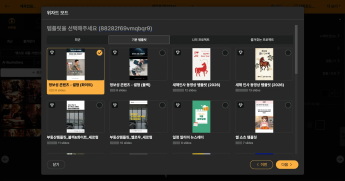
Now it's time to pick a 2023 Christmas video letter template from VideoStew's selection. Click "Change Template" on the top left, then select "Load from template".
< Directly>
A variety of templates will appear, as seen below. Let's try one of the Christmas video templates at the top – for this post, we'll go with the second one. Then, simply return to the original screen and proceed.
< Select a template and confirm >
The editing screen will open as videos matching your generated text appear automatically. For a sneak peek, head straight to "Preview > Full Preview" on top. Feel free to modify any text or content that doesn't quite fit. A nifty editing tip is to ensure sentences aren't awkwardly split across slides.
< Automatically>
Rendering and Sharing via KakaoTalk
With no further edits needed, press "Download" on the top right to start rendering – that's when our server crafts the MP4 file.
Once rendering is done, the "Download" button will change color, indicating that you can transfer the file to your computer.
< The>
If you've created a Christmas video letter, you can also share it easily using a shareable URL. Use the "More > Share" option, which provides a web-ready URL to paste straight into messaging apps like KakaoTalk.
< Share>
Happy Holidays from VideoStew
<iframe src="https://www.youtube.com/embed/OX98o5Sf3qI" allowfullscreen=""></iframe>
Use VideoStew's Christmas greeting templates to send your heartfelt congratulations and thanks to those around you :)