
Logo
Junwoo
2024-12-17 15:51:17

University
What’s the Ultimate Slide-Based Video Editor? (The Complete 2026 Guide)

“I hit 100K views with just a single YouTube Short!”, “I made a full video in 3 minutes using AI!”

If you’ve been on social media lately, you’ve probably seen stories like these over and over again.

Since the arrival of ChatGPT, AI has been transforming the world of video creation in truly radical ways. Brands in particular are paying close attention to the explosive marketing power of short-form content on platforms like YouTube Shorts, Instagram Reels, and TikTok.

In fact, according to recent research, the engagement rate of short-form videos is, on average, more than 150% higher than that of regular posts. That’s why everyone—from large enterprises to startups, and even your neighborhood coffee shop—is jumping into video content creation.

And this is where the real-world struggle begins.

“Hiring a professional editor is too expensive…” “Premiere Pro looks impossible to learn.” “I need to publish videos every day, but it just takes way too long.”

That’s exactly why a variety of online video editing tools are getting so much attention. Among them, today we’re going to take a closer look at one category in particular: “slide-based video editing platforms.”

Let’s dig into how effective these PowerPoint-style, familiar interfaces really are—and more importantly, which tool is actually the best fit for your goals.

Thanks to recent advances in AI, these tools are getting smarter every day. From template recommendations to automatic editing, they’re lowering the barrier to entry while raising the quality of your final videos.

So which tool will match your needs best and actually make your life easier?

Slide-based video editors vs timeline-based video editors

What is a timeline-based editor?

< Adobe Premiere Pro editing screen, Source: Adobe >

Traditional video editing programs like Premiere Pro, Vegas, and Final Cut Pro are all based on a ‘timeline’ workflow.

Think of it as visualizing the flow of time: you lay out various elements horizontally along a timeline that represents the playback time of your video.

Key characteristics of timeline-based editing:

  • Stack multiple tracks (layers) vertically to create complex edits
  • Control each element—audio, video, subtitles—frame by frame with precision
  • Use keyframes for fine-tuned motion and effect control
  • Overlap or blend multiple clips to create more imaginative scenes
  • Support for professional transitions like crossfades and dissolves
  • Let’s say you’re editing an interview video.

    In a timeline-based editor, you might:

    1. Place the main interview footage on the bottom track
    2. Add cutaway shots (B-roll) on a track above it
    3. Put background music on another track
    4. And finally, add subtitles on the top track—stacking layers as you build your edit.

    What is a slide‑based editor?

    < Editing screen of Videostew, a classic slide‑based video editor >

    Slide‑based editors work in a way that feels very similar to PowerPoint. Each scene is treated like a single slide, and these slides play in sequence to form one complete video.

    Key characteristics of slide‑based editing:

  • Each scene acts like an independent canvas
  • Elements on a screen are arranged using a layout‑style interface
  • Easily change scene order with simple drag‑and‑drop
  • Individually set duration and transition effects for each slide
  • Quick production using templates
  • For example, if you’re creating a product promo video:

    1. First slide: product name and key image
    2. Second slide: list of main features
    3. Third slide: how‑to‑use explanation
    4. Final slide: purchase information — you structure the video just like building a presentation.

    These two editing approaches are based on completely different ways of thinking about video. Timeline‑based editing is about combining multiple elements along the ‘flow of time’, whereas slide‑based editing builds your story by arranging a ‘sequence of scenes’.

    Shall we take a closer look at the pros and cons of slide‑based editing, which is the main topic of this post?

    Pros and cons of slide‑based editing

    Advantages of slide‑based video editing software

    Intuitive storytelling structure

  • Each scene is displayed as an independent slide, so you can see the entire narrative structure at a glance
  • PowerPoint-like structure that even beginners can easily understand
  • No need to create a separate storyboard – plan and produce at the same time
  • Effortless layout work

  • Freely place and align elements within each scene
  • Intuitively manipulate images, text, shapes, and more
  • Faster production speed

  • Jump right in with ready‑made templates
  • Easy to estimate working time for each scene
  • Perfect for splitting work across multiple team members
  • Drawbacks of slide‑based video editors

    Limits in visual continuity

  • Hard to achieve truly natural transitions between slides
  • Each scene is independent, which can make the video feel choppy
  • Transition effects are limited and can feel a bit mechanical
  • Restrictions on detailed editing

  • Cannot fine‑tune timing at the frame level
  • Limited support for complex motion or animations
  • No keyframe‑based control for subtle, nuanced movement
  • Limitations in media editing

  • Audio editing and mixing features are quite basic
  • Lacks advanced tools like chroma keying and masking
  • Comparing major slide‑based video editors

    Canva

    < The world’s largest online design platform now does video editing >

    Key features:

  • A design platform with over 400 million users worldwide
  • Access to more than 10 million templates and stock assets
  • Brand Kit lets teams centralize and manage all brand design assets
  • Real‑time collaboration for fast, frictionless teamwork
  • Video editing features:

  • Intuitive drag-and-drop editing interface
  • Support for multiple aspect ratios (16:9, 9:16, 1:1, 4:5, etc.)
  • Essential trimming and cutting tools
  • Text animations and simple motion effects
  • Music library and basic audio editing tools
  • Pros:

  • Massive collection of free templates and design assets
  • Fully equipped with business elements like graphs, charts, and infographics
  • Learn fast with a highly intuitive interface
  • Rich collaboration features for team projects
  • Easily manage assets with integrated cloud storage
  • Direct sharing to social media platforms
  • Cons:

  • Lack of variety and quality in Korean-language templates
  • Usability drops sharply when you try detailed customization
  • No advanced, professional-grade video editing features
  • Difficult to apply complex animations or effects
  • Scene transitions feel unnatural and are quite limited
  • High subscription costs when using premium assets
  • Miricanvas

    < A video editing solution born from a Korean-style design platform >

    Features:

  • Design templates tailored specifically for the Korean market
  • Fully localized, intuitive Korean interface
  • Layouts optimized for Korea-style content
  • Video editing features:

  • Basic slideshow creation
  • Simple text motion
  • Image-based video creation
  • Basic scene transition effects
  • Pros:

  • Design templates that match Korean aesthetics and culture
  • Quick and easy content creation
  • Reasonable pricing
  • Korean-language customer support
  • Cons:

  • Lack of professional video editing features
  • Limited template customization
  • Inconvenience caused by separate design/video modes
  • No voice editing features
  • Limited format support
  • Videostew

    < Editing interface of Videostew, an AI-powered professional video editor >

    Key characteristics:

  • A video editing solution designed for collaboration between AI and humans
  • All-in-one video creation environment (TTS for all major languages, stock library, BGM, voice recording, auto subtitles, and more)
  • Editing tools that are both intuitive and professional
  • Core features:

  • AI-powered rapid draft creation
  • Pro-level customization tools
  • Convert any blog URL into a video
  • Built-in GPT 4o for going from idea to finished video in one flow
  • Responsive design features that automatically convert horizontal videos to vertical (and vice versa)
  • Strengths:

  • Efficient workflow where AI kickstarts and humans polish
  • High productivity and professional quality at the same time
  • Intuitive interface that anyone can use with ease
  • Web-based, so you can access it anytime, anywhere
  • Flexible integration with a wide range of AI tools
  • Weaknesses:

  • 20-minute limit per project as a web-based service
  • Heavier, high-spec projects may require more loading time
  • What makes it different:

  • Delivers an optimal collaboration experience between AI and humans
  • Fine-grained customization for studio-grade results
  • The only solution that seriously balances efficiency and quality
  • A constantly evolving platform with continuous AI feature upgrades
  • Conclusion: Choose what fits your purpose best


    The three solutions we’ve looked at so far each have clear strengths, weaknesses, and unique personalities. The right choice really depends on your goals, your workflow, and how involved you want to be in the editing process.

    Canva is a good fit if you...

  • Need a simple slideshow-style video for social media
  • Want to quickly turn photos you already have into a short video
  • MiriCanvas is a good fit if you...

  • Want templates with a distinctly Korean design flair
  • Need to produce simple promo videos in a hurry
  • Mainly create image-focused, lightweight videos
  • We strongly recommend Videostew if you...

  • Regularly upload content to YouTube, Instagram, and other platforms
  • Work in a brand-conscious company or are a startup marketing manager
  • Want to save time without sacrificing production quality
  • Want to create professional-grade videos on your own
  • Want to dramatically cut production time with a little help from AI
  • If you create content where clear information delivery is key—think explainers, tutorials, product breakdowns—Videostew can be the perfect solution. AI helps you build a solid first draft in no time, and then you can dial in the details with pro-level customization to get the exact quality you’re aiming for.

    Try it yourself for free

    Right now, countless creators are crafting remarkable content with Videostew. You can join them too—experience the fun of AI-powered video creation with Videostew’s 14-day free trial and see how much faster and easier your workflow can become. 🚀

    Try Videostew right now

    Go to Article

    Join for the newsletter and get the news

    E-mails collected are not used for any purpose other than sending newsletters and can be withdrawn at any time

    You're subscribed to the newsletter 🎉

    We'll come back with useful news
    E-mails collected are not used for any purpose other than sending newsletters and can be withdrawn at any time
    🎓 What's the Best Text to Video AI for Content Marketers? 🤔 This is a sincere, elaborate, and friendly guide from Jun, the operator of Videostew, dedicated to all content marketers tirelessly searching for the “best text...
    What's the Best Text to Video AI for Content Marketers? 🤔
    Junwoo 2025-06-09
    🎓 YouTube Shorts Aspect Ratio and Layout Guide (2025) YouTube Shorts: Why is 'Aspect Ratio' the First Button to Push?Ever heard of the terms 'lean back' and 'lean forward'?'Lean back' is exactly what it sounds like...
    YouTube Shorts Aspect Ratio and Layout Guide (2025)
    Junwoo 2025-05-01
    🎓 5 Types of Instagram Reels Small Commerce Businesses Should Try Right Now Instagram Reels have become an essential marketing channel for commerce marketers, not just an option. In fact, according to Meta's announcement in the second q...
    5 Types of Instagram Reels Small Commerce Businesses Should Try Right Now
    Junwoo 2025-03-26
    🎓 Factors to Consider When Choosing an AI Video Editor (2025) Recently, AI video editors have become a hot topic in the video editing industry. There's a surge of automated video editing software that promises to create st...
    Factors to Consider When Choosing an AI Video Editor (2025)
    Junwoo 2025-03-05
    🎓 Guide to Choosing a Faceless Video Creation Tool (2025): Don’t Be Fooled by AI Auto-Creation Claims Many YouTube channel managers and aspiring creators are looking to start their channels with faceless videos. This approach allows them to skip the cumbersome f...

    Guide to Choosing a Faceless Video Creation Tool (2025): Don’t Be Fooled by AI Auto-Creation Claims
    Junwoo 2025-01-09
    🎓 What’s the Ultimate Slide-Based Video Editor? (The Complete 2026 Guide) “I hit 100K views with just a single YouTube Short!”, “I made a full video in 3 minutes using AI!”If you’ve been on social media lately, you’ve probably seen st...

    What’s the Ultimate Slide-Based Video Editor? (The Complete 2026 Guide)
    Junwoo 2024-12-17
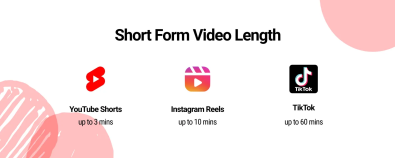
    🎓 3-Minute YouTube Shorts: Everything You Need to Know What are 3-Minute YouTube Shorts?Starting October 15, a new update allows users in North America to upload YouTube Shorts up to 3 minutes long. With this update...
    3-Minute YouTube Shorts: Everything You Need to Know
    Junwoo 2024-10-31
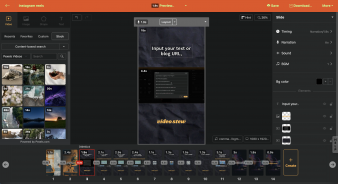
    🎓 The Best inVideo AI Alternative for Content Marketers Hello there! With a plethora of AI-based video editing tools flooding the market these days, have you ever pondered which tool to pick as a content marketer?In ...
    The Best inVideo AI Alternative for Content Marketers
    Junwoo 2024-09-26
    [Stop]
