
Junwoo
2023-01-30 23:58:01
Inspiration
Got YouTube Shorts? Start a Challenge with Your Own 'Theme' and 'Method'
🎓
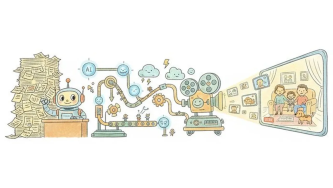
AI Video Creation Isn’t a Tool Problem: Where Creators Actually Get Stuck (and How to Break Through)
By the time you’ve landed on this post, you’ve probably read your fair share of “Top AI Video Tools” articles. You’ve seen everything from clip-generation servi...
🎓
Why Your Newsroom’s YouTube Channel Is Packed with Articles—but Starving for Videos
When we talk with our media clients, we hear the same thing again and again."We opened our YouTube channel two years ago, but we still don’t even have 10 videos...
🗞️
[Update] Effortless Video Creation with Just an Account API Token – No SDK Needed
What’s NewPreviously, using the Automation API meant you had to go through the hassle of creating a separate SDK. Now, you can jump straight into auto-generatin...
![[Update] Effortless Video Creation with Just an Account API Token – No SDK Needed](https://cdn.videostew.com/files/thumb/9a371f670-7vcfraxg8)
🗞️
[Update] AI Video Clip Generation Feature
You can now generate AI video clips in Videostew using nothing but a text prompt.In your Library, go to the Visual tab, choose the AI Video category, then click...
![[Update] AI Video Clip Generation Feature](https://cdn.videostew.com/files/thumb/a0de300fe-7vbjxvbd6)
🗞️
[Update] Large File Uploads for Your Videos
Videostew now lets you upload large video files up to 1GB.Previously, you were limited to 250MB per upload, so you had to manually split your video into smaller...
![[Update] Large File Uploads for Your Videos](https://cdn.videostew.com/files/thumb/36cb53236-7v6dmsmeg)
🎓
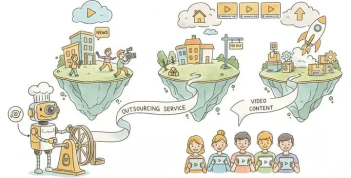
Before You Outsource Your Corporate Video, Read This First!
If you’re working as a marketer in a company, you’ve probably experienced moments like this: someone from the top casually says, “Shouldn’t we be doing YouTube ...
🗞️
[Update] Create Podcast-Style Videos in a Snap
A new writing style, the Podcast Format, has just been added to Videostew.When you select the podcast format in either [Start from an idea] or in Polishing mode...
![[Update] Create Podcast-Style Videos in a Snap](https://cdn.videostew.com/files/thumb/133403bd4-7v2jle8ng)
🎓
Are You Sure You’re Even Choosing the Right Type of “Free Video Site”?
You want to start making video content, but you’ve got no budget and monthly fees for paid tools feel a bit painful. So you search for “free video sites” and… i...

We had a chance to discuss with the operator of 5060 Health Info channel that achieved 43,000 subscribers in just four months with VideoStew.
5060 Health Info is a health information channel for middle-aged people, curating articles filled with medical insights. Mr. Jo Sunyoung, the operator of this channel, is technically a rookie YouTuber with five months of channel management experience. Yet, he has a rich well of practical tips and strategies from his past experience in managing YouTube channels.
If you're thinking of starting your own YouTube channel, it's worth a read!
Now, let's listen to Mr. Jo Sunyoung's story regarding the operation of 5060 Health Info.
Start is Half the Battle. Challenge with Your Theme in a Stress-Free Way
Two years ago, I ran a channel about real estate. I managed to secure around 4,000 subscribers but filming and editing each time was burdensome. Eventually, I had to let it go.
But my longing for running a YouTube channel remained. While doing other work, I continuously pondered on a topic I could handle well. In my case, it became health information for the elderly.
But when I tried to start, it wasn't easy. I used to use Final Cut, but extracting (rendering) was highly stressful. Even though I was using a MacBook Pro, frequent crashes made me think it wasn't suitable for making YouTube videos. (
Although, it was an old model…)That's when I found out about VideoStew. I thought with this, I might be able to test my topic without any trouble. I decided to try my 'theme' using VideoStew as the 'method'.
Try the Waters with YouTube Shorts
Initially, I made long-form videos over 8 minutes with informative content. I gathered around 500 subscribers in a month, but it halted there. The number of views didn't match the production time, and the subscribers weren't increasing much, so I began to lose my drive. It took approximately 8 hours to make an 8-minute video, including planning, script writing, editing, and uploading.
That's when I thought of YouTube Shorts and started making one-minute health information videos. Since the scripts were short, the total production time was cut down to about two hours. Since it takes only 30 minutes of editing time with VideoStew, I was able to upload contents without any pressure.
After starting with Shorts, the reactions started coming in. I garnered 16,000 subscribers in a month, and now I've grown to 43,000 subscribers. And recently, I signed up for the YouTube Partner Program, so now I anticipate some earnings.
<iframe src="https://www.youtube.com/embed/IWas9Vyg84k" allowfullscreen=""></iframe>
Creating YouTube Shorts requires less effort (1/4 compared to the long-form), and due to better exposure, there's a higher chance of soaring (“rising steeply”). For those starting a channel, I think starting lightly with YouTube Shorts and checking reactions would be a good approach.
Capture Opportunity through VideoStew
There's a gnarly stretch where you might give up if the views or subscriptions aren't increasing compared to the time you put in. I felt that when I was using Final Cut too.
If you have a good theme, the opportunity will invariably come. But if you need to consistently film and edit, you might get weary before the opportunity comes.
From this viewpoint, I think VideoStew is an excellent solution that helps you quickly bounce back from that slump. There are many features that significantly cut down the time spent on making a video.
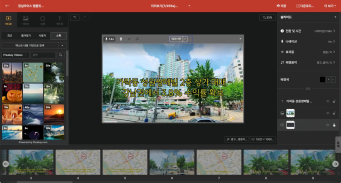
For instance, the fact that a stock library is built-in is a great strength. Searching for stock images or videos while making a video is very time-consuming. With VideoStew, you don't have to visit other sites and you can solve it all in one place, which is really convenient.
Being able to directly use AI voice is another big advantage. Previously, I had to use a separate TTS solution to create a voice, upload it to an editing program, and edit it while syncing. But with VideoStew, I could do all these in one place.
One reason I recommend VideoStew especially to those starting out is because the solution itself is intuitive. You can get accustomed to it by playing around for 1-2 hours and use it right away.
These strengths help you quickly jump over the exhausting period that you're bound to experience.
Keep Trying New Things by Watching Subscribers' Reactions
I was honestly a bit burdened about this interview since I am not a successful YouTuber yet. But I agreed to do this interview with the intention of growing together by sharing my experiences and trials.
I am still trying new things. Even if you have a big channel with a theme like health information, the topics will inevitably shift over time, right? I don't think we should be scared of this change.
In line with this, we'll need to innovate even in terms of format. I haven't properly utilized it yet but I'm planning on using the voice recording feature of VideoStew to present videos with my voice, or challenge myself to make videos with more explanatory power using animations.
In truth, if I were to try new techniques from scratch, it would be an enormous undertaking. But it is definitely less daunting because of VideoStew. From a design editing perspective or in terms of using animations, there are some improvements I wish VideoStew could make. As my requests are considered and implemented, I also plan on continually testing and challenging my videos with more diverse formats.
Last Words for Those Launching on YouTube
As a new YouTuber, if I were to borrow the words of big YouTubers, everyone can become a YouTuber if they have their “theme” and know the “method”.
I think the most important thing from a methodical standpoint is to create quickly and see the reaction. VideoStew was the perfect solution for me in that respect. It's easy to learn and makes rapid creation possible, so you can instantly check reactions.
A word of advice for those about to start is that there will be a period where you're bound to get weary. And when that period comes, it's important to start with an 'efficient method' that allows you to quickly bounce back.
As a beneficiary (?) of VideoStew, I really appreciate it. Thanks to VideoStew, I was able to run the channel I wanted to and achieved some modest results in a short time. I hope to grow further and have the opportunity to share more insights through another interview in the future :)