
Junwoo
2026-05-04 19:46:04
Announcement
[Update] AI Video Clip Generation Feature
🗞️
[Update] Fresh New Voices Have Arrived on Videostew!
Exciting news: ElevenLabs v4 voices have officially landed in Videostew's AI narration library! Compare the new voices with our classic ones on the exact same l...
![[Update] Fresh New Voices Have Arrived on Videostew!](https://cdn.videostew.com/files/thumb/68c1b09fd-7xl9m1x7u)
🎓
Automated Real Estate Video Creation: How to Run a YouTube Channel Using Just Your Blog Posts
When chatting with real estate agents, we often notice a familiar pattern: blog posts are updated daily like clockwork, while their YouTube channels look like g...

🗞️
[Update] From Generating Images to Remixing and Video Creation—All in One Place!
Just double-click any image in the editor, and boom! You can now jump straight into four powerful AI actions.Create a completely fresh image based on your slide...
![[Update] From Generating Images to Remixing and Video Creation—All in One Place!](https://cdn.videostew.com/files/thumb/980c7babf-7x4chx14a)
🤔
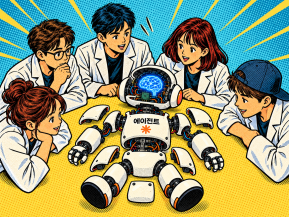
Building an AI Agent from Scratch: Let's Demystify the Magic!
In our previous post, Smart Token-Saving Hacks for AI Agents, we explored quick tips to cut down on tokens right away. This time, we’re peeling back the curtain...
🤔
Smart Ways to Save Tokens with AI Agents (Without Losing the Magic)
Must be nice if your company covers your token bills, but for a scrappy startup like ours, token cost-efficiency (or simply surviving the invoice) is practicall...

🤔
Setting Up the Dev & Ops Environment for Our Secret Agents 🚀
At Stew, we're sharing how we set up and utilize our environment for agent-based coding (while continuously supercharging our AI video editor behind the scenes!...

🗞️
[Update] Give Stock and Uploaded Photos an AI Makeover with 'Generative Edit'
You can now refine and reuse the images you already have—no need to toss them out and start over. With the newly added 'Generate Edit' feature, the image curren...
![[Update] Give Stock and Uploaded Photos an AI Makeover with 'Generative Edit'](https://cdn.videostew.com/files/thumb/274c0ca30-7wwu05ktr)
🎓
Why You Pick a Shorts Template, Make Three Videos, Then Never Use It Again
Search for Shorts templates, and you’ll find an endless supply of free options. But after downloading one and making about three videos, many creators find them...


You can now generate AI video clips in Videostew using nothing but a text prompt.
In your Library, go to the Visual tab, choose the AI Video category, then click the [+ Add] button to open the prompt input screen.
A suitable descriptive prompt is automatically generated based on your content, so you can use it as-is or overwrite it with your own text description of the scene you want. Every generated clip is saved to your Library, and with the Favorites feature you can easily reuse your best clips anytime.
Credit-based usage
AI video generation uses credits. You can check your current credit balance at the top right of the generation screen. (The current model costs 500 credits per clip.)
Great ways to use this feature
Right now, the Wizard mode can automatically generate AI images that match your full script, but we’re already working on upgrading it so that it can auto-generate AI videos as well. Stay tuned. 🚀