
Junwoo
2026-06-01 18:32:17
University
These days, I’m running Videostew with a little help from Claude Code
🎓
Automated Real Estate Video Creation: How to Run a YouTube Channel Using Just Your Blog Posts
When chatting with real estate agents, we often notice a familiar pattern: blog posts are updated daily like clockwork, while their YouTube channels look like g...

🎓
Why You Pick a Shorts Template, Make Three Videos, Then Never Use It Again
Search for Shorts templates, and you’ll find an endless supply of free options. But after downloading one and making about three videos, many creators find them...

🎓
Automating shorts is easy—getting them consistently great every time is the real challenge
If you search for shorts automation, you’ll find endless workflow tutorials that promise everything at once: script generation, images, voiceover, even upload. ...

🎓
Before You Pick an AI Video Editor, Decide *What* You Actually Want to Make
When you read those “Top 5 AI video makers” listicles, they usually bundle all the trendy tools together, compare pros and cons, and highlight key features.But ...
🎓
Outsourcing AI Video? Before Getting a Quote for Just One Video, Ask Yourself: "How Many Will We Need on Repeat?"
Whenever people reach out to us about outsourcing AI video production, their first message is almost always the same. It pretty much boils down to: “So... how m...

🎓
These days, I’m running Videostew with a little help from Claude Code
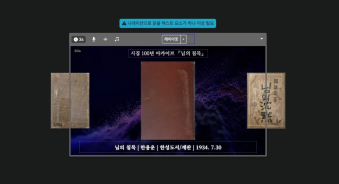
Recently, we landed a pretty big gig with our VX production service. To celebrate the opening of the Manhae Museum, we’re creating a full digital video archive ...
🎓
AI Video Creation Isn’t a Tool Problem: Where Creators Actually Get Stuck (and How to Break Through)
By the time you’ve landed on this post, you’ve probably read your fair share of “Top AI Video Tools” articles. You’ve seen everything from clip-generation servi...
🎓
Why Your Newsroom’s YouTube Channel Is Packed with Articles—but Starving for Videos
When we talk with our media clients, we hear the same thing again and again."We opened our YouTube channel two years ago, but we still don’t even have 10 videos...

Recently, we landed a pretty big gig with our VX production service. To celebrate the opening of the Manhae Museum, we’re creating a full digital video archive of all poetry collections by Manhae Han Yong-un from the last 100 years. The project involves designing custom motion graphics for each book cover, so it’s a lot more work than it sounds at first. 😅
Given the sheer volume, we naturally started asking ourselves: how can we crank up our productivity even more? We experimented with bundling workflows in n8n, tried running scripts with OpenAI Codex, and eventually landed on this setup: driving the Videostew API like an agent on top of Claude Code. Today, we’d like to take you behind the scenes of how that actually works.
Even clicking around in Wizard Mode started to feel like a waste of time…
Videostew has a feature called Wizard Mode. You drop in a chunk of text, follow a step-by-step guide, and it builds your slides for you. If you’re not fully satisfied with the result, you can jump straight into the editor and tweak everything to your liking.
Honestly, that alone is more than enough to produce a video. It’s not hard, and it’s pretty fast.
The catch is automation. If you’re making one or two videos a day, a few clicks to finish each one is no big deal. But when you suddenly have to make 100 of them, every single click starts to feel strangely… heavy.
That’s where our Data mode – essentially our API mode – comes in. If you craft the payload properly and send it in one shot, Videostew automatically generates a video where every slide is filled with exactly the elements you specified.
It’s perfect when you have a well-defined template and just need to swap in different content for large-scale production. This Data mode API is tailor-made for projects like this.
It also came in really handy when we needed a video with lots of animation. We had to create a morphing sequence of 89 book cover images, each one appearing and then fading out in turn. Doing that one by one in the UI would’ve been a serious patience test. So we went with the API route instead.
Creating a 89‑cover book morphing animation with the API
Within the Manhae Museum archive project I mentioned earlier, there were several different content tracks. One of them was a special archive video celebrating the 100th anniversary of the publication of “The Silence of My Beloved”. For this video, I’ll walk you through how we used the Videostew API via Claude code, focusing purely on this project’s workflow.
In our VX business, there’s a type of work that always automates beautifully: when there’s a clear, well-defined source text, like a single blog post or a news article.
You throw in the text, and the system takes care of the rest, producing a polished result. The person in charge just does a final review and a tiny bit of touch-up, and the job’s basically done. (Or, if you dial in the setup perfectly, you don’t even need that.)
But this cover-image animation was a different beast. It didn’t really fit into the usual “turn text into video” pattern.
From the first edition in 1926 to the newest edition in 2025, we had to run through the covers of books from 89 different publishers as a continuous morphing animation. Videostew does have an auto-animation feature, so making it wasn’t technically hard — but with 89 slides, it was clear this would be a click-fest if we tried to build it manually.
Here’s the structure we designed. The book cover that sits in the center on slide 1 shifts to the left on slide 2, and then moves completely off-screen on slide 3. A new cover enters from the right, moves to the center, then flows again to the left. Rinse and repeat. It’s a simple motion pattern — but repeated 89 times, it’s exactly the kind of work you want an API to handle for you. 😄
With Videostew’s auto-animation, all you have to do is place the same image in a different position on the adjacent slide and it automatically morphs between them. So really, the only “work” is placing each book cover image correctly on each slide. (The only catch: there are a lot of them…)
AI lives for this kind of repetitive work
So I just lobbed it over to Claude Code and said, "Please build me a payload that makes 89 book covers flow with this kind of morphing." Then I watched, amazed, as it handled everything on its own.
I had two “wow” moments.
The first was when the AI asked me a question before I even thought of it. I hadn’t considered looping the video, but it suggested it first. Claude asked, "For the right-hand image on the last slide, should we wrap it around to the first book to make a loop, or leave it empty?" When your AI proactively suggests a better UX, it’s hard not to be a little moved…
The second moment was the auto-matching. The 89 book cover files had names like "086. 님의 침묵 비타민북.jpg", and separately I had an Excel sheet with metadata for 100 books: number, title, author, publisher, publication date, all neatly organized. Claude automatically matched the file’s leading number to the correct Excel row and even filled in the text elements of the payload on its own. I don’t think “convenient” even begins to cover it.
And at the final step, it said, "Don’t run everything at once—test a few first." Thanks to that gentle nudge, I saved resources, tested with just five slides to make sure everything worked perfectly, and only then ran the full batch.
But why did I still choose Videostew?
I may be running Videostew, but my time is still my most precious resource—so of course I checked out other tools too. I even tried Remotion, which is all the rage these days.
After trying everything, though, I realized Videostew has a very specific advantage: it runs based on templates that I design myself. I visually set up the template, then hand over only the repetitive part of the work to AI. That way I can clearly predict and control what kind of video will come out at the end.
With generative AI video tools, every result is basically a lottery ticket. Even with the same prompt, the tone of the video, the pacing of the cuts, the overall composition—everything changes every single time. That’s just how LLMs behave; no matter how tightly you try to strap them in with guardrails, they’ll still go off-key once in a while.
With Videostew, once you set up a template properly, the same payload will always produce the same structure of video. I can already “see” in my head, “If I wire it up like this, I’ll get this kind of video.” Thanks to that, I’ve been able to automate all sorts of wild use cases.
From the perspective of someone trying to automate workflows, this predictability feels absolutely crucial.
To be honest, we’re scrambling too
By dogfooding our own solution’s API, I’ve come to realize one thing: the era of just making great editors for humans is at least halfway over.
From now on, what will matter more and more is having APIs that are easy for AI to drive, template systems that behave predictably, and data-driven ways of injecting content into slides. I suspect Remotion is popular in a similar context—but after actually using it, it felt a bit tough to roll out at a typical company scale.
In the end, we’re heading toward a world where agents automatically crank out production‑quality videos with basically a single click. When that day comes, the tools that survive will be the ones that run cleanly and reliably from an AI’s point of view.
Videostew is hustling right in the middle of this wave. We’re polishing the human-facing editor, while constantly upgrading our API and automation infrastructure. Some parts feel overwhelming, but honestly, it’s pretty fun. And I’ve realized the fastest way to improve is to use our own API, feel the pain, and fix it. In fact, our VX service was born from exactly that mindset.
The video I made today is, on the surface, nothing fancy: 89 book covers flowing in a single line. But through that simple experience, I can see where Videostew is heading and how it’s evolving, one small experiment at a time.