
Junwoo
2026-05-09 18:44:58
University
AI Video Creation Isn’t a Tool Problem: Where Creators Actually Get Stuck (and How to Break Through)
🎓
Why You Pick a Shorts Template, Make Three Videos, Then Never Use It Again
Search for Shorts templates, and you’ll find an endless supply of free options. But after downloading one and making about three videos, many creators find them...

🎓
Automating shorts is easy—getting them consistently great every time is the real challenge
If you search for shorts automation, you’ll find endless workflow tutorials that promise everything at once: script generation, images, voiceover, even upload. ...

🎓
Before You Pick an AI Video Editor, Decide *What* You Actually Want to Make
When you read those “Top 5 AI video makers” listicles, they usually bundle all the trendy tools together, compare pros and cons, and highlight key features.But ...
🎓
Outsourcing AI Video? Before Getting a Quote for Just One Video, Ask Yourself: "How Many Will We Need on Repeat?"
Whenever people reach out to us about outsourcing AI video production, their first message is almost always the same. It pretty much boils down to: “So... how m...
🎓
These days, I’m running Videostew with a little help from Claude Code
Recently, we landed a pretty big gig with our VX production service. To celebrate the opening of the Manhae Museum, we’re creating a full digital video archive ...
🎓
AI Video Creation Isn’t a Tool Problem: Where Creators Actually Get Stuck (and How to Break Through)
By the time you’ve landed on this post, you’ve probably read your fair share of “Top AI Video Tools” articles. You’ve seen everything from clip-generation servi...
🎓
Why Your Newsroom’s YouTube Channel Is Packed with Articles—but Starving for Videos
When we talk with our media clients, we hear the same thing again and again."We opened our YouTube channel two years ago, but we still don’t even have 10 videos...
🎓
Before You Outsource Your Corporate Video, Read This First!
If you’re working as a marketer in a company, you’ve probably experienced moments like this: someone from the top casually says, “Shouldn’t we be doing YouTube ...

By the time you’ve landed on this post, you’ve probably read your fair share of “Top AI Video Tools” articles. You’ve seen everything from clip-generation services like Pika and Runway to full creation & editing tools like Vrew, Canva, and Videostew, complete with feature breakdowns, pros, and cons.
Yet the question we get most often while running Videostew is always the same: “So… which one should I actually use?” There isn’t a single right answer. Each tool is good at something different, and the “best” choice depends on what kind of video you want to make, and how you want to make it.
One thing we can say for sure: the tools are not the problem.
So many tools, but why are there so few finished videos?
To make just one video, you typically need to go through a lot of steps: script, images, narration, subtitles, background music, editing, and finally uploading. And every tool tends to specialize in only some of these. Pika and Runway are great at generating cinematic visuals, Pika shines at fast, punchy clips, Vrew automatically creates subtitles from your recorded footage, and Videostew is built for turning a text script into a complete video in one automated workflow.
The catch? All of these steps still have to connect for a single video to go live.
If you only compare tools, you might skip the more important question: “With what materials, what kind of videos, and how frequently do I want to create content?” If a tool’s strengths don’t match the way you work, you won’t get good results—no matter how powerful it is.
3 criteria that actually matter in AI video creation
1. What’s your starting material?
Whether you start from text, or from existing images and footage, completely changes the stack of tools you really need.
If you already have text—like news articles, educational content, or marketing copy—then a text-to-video (TTV) workflow is far more efficient. On the other hand, if you’ve got product shoots or event footage, you’ll want tools focused on AI editing, subtitles, and music instead.
Many people skip understanding their own “ingredients” first and jump straight into “What’s hot right now?” when choosing tools. That’s how you end up pouring hours into a workflow that just doesn’t fit you.
2. Can this workflow be repeated at scale?
In most cases, your goal isn’t to make just one video and be done. If you’re running a YouTube channel, producing newsletter videos, or creating a product intro series, you need to publish regularly. Then the key question becomes: “Can I produce multiple videos at the same quality in one go?”
Once you use this as a filter, the whole tool landscape looks different. Tools like Sora or Kling produce impressive video quality, but they’re not exactly built for repeatable, scalable production. On the other hand, tools that support automation via API or template-based editing become incredibly powerful: you invest a bit more in setup at the beginning, and everything gets much easier afterward.
3. Where will you actually use the final video?
Is it for YouTube long-form, Shorts, Instagram Reels, or internal training? Each use case comes with its own format requirements. Every platform has different recommended aspect ratios, and even the ideal subtitle position and length can vary. If vertical video (Shorts, Reels) is your main focus, you’ll want to carefully check how well the editor supports vertical formats. We’ve summarized the key points in our YouTube Shorts size and aspect ratio guide, so feel free to bookmark it.
Stories from real-world workflows
This is exactly the kind of problem we wanted to solve when we started building Videostew.
Some of our most active users today are newsrooms and corporate PR teams. They need to churn out similar formatted videos every day or every week—reliably. In that environment, a one-off “masterpiece” matters less than having a repeatable pipeline where “you drop in a script and a finished video comes out.” When they try stitching together multiple tools—one for voice, another for subtitles, another for editing—they end up spending more time instead of less. We’ve heard that feedback over and over again.
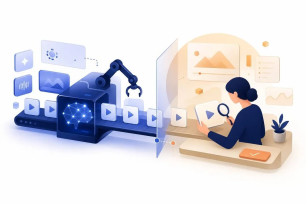
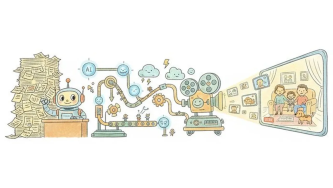
That’s why Videostew isn’t designed as just another single editing tool—it’s more like a “pipeline where you drop in a script and a finished video comes out.” From text input, automatic image matching, narration generation, subtitles, all the way to format conversion, everything flows in one streamlined process.
Of course, Videostew isn’t the perfect answer for every situation. If your goal is a single cinematic, jaw-dropping shot, Runway or Sora should probably come first. And if you want to obsess over the details in one or two videos by hand, traditional editing tools will suit you better. But if you need to produce “a lot of videos, consistently, in the same tone,” then approaching the problem from a pipeline perspective is usually the most efficient way.
We’ve also put together a separate article on how to choose the right AI video editing solution, so it’s worth reading alongside this one.
How to start AI video production (and dramatically lower your chances of failing)
First: take stock of the ingredients you already have (text, images, video sources).
Second: design your workflow from a perspective of repeatable production, not a one-off project.
Third: choose your tools only after your workflow is clear.
If you flip this order, you can use the best tools in the world and still get disappointing results. You’ll end up blaming the tool, then jumping to another one, and the cycle repeats. 😵💫
AI video creation tools are evolving at high speed. What was “best” six months ago might not be today, and it’ll keep changing. That’s why it’s far more powerful in the long run to solidify your own workflow first, instead of getting overly attached to any specific tool.
FAQ
Q. I’m totally new to AI video tools. Where should I start?
Don’t start by hunting for tools—start by sorting out the “ingredients” you already have. If you’ve got a script or written content ready, a text-to-video tool will be the fastest route. If you already have footage, look for tools that specialize in auto-subtitles and smart editing first. Your starting point should decide the tool, not the other way around.
Q. Why do AI-generated videos sometimes feel a bit… awkward?
When you leave everything to full auto, it’s common for the visuals and script tone to feel slightly out of sync. Just hand-picking a few key scenes or tweaking the narration speed and tone once can make the final result look dramatically better. In fact, among Videostew users, those who “quickly scan the auto-matched images and swap out only the core shots” report the highest satisfaction.
Q. How much does it cost?
There are now plenty of tools you can start with for free, and when you get into serious production, most paid plans start at around $15–$40 per month (roughly equivalent to 20,000–50,000 KRW). But the real efficiency depends on “how many videos you’ll make per month.” If you’re only making one or two, a free plan is usually enough. If you need to publish several videos every week, jumping straight into a paid plan is actually cheaper once you factor in the time you save.
Q. Will the AI handle Korean content naturally?
Korean narration and subtitles have improved a lot in just the last 1–2 years. That said, subtle honorific nuances and natural line breaks in Korean are usually handled more reliably by platforms that focus primarily on Korean. If Korean videos are going to be your main content, starting with a Korea-based service as your first candidate will save you a lot of trial and error.
Q. Can I automatically create multiple videos at once?
Yes, if the platform provides an API. Videostew also offers an API where you just send your script data and the videos are generated automatically. It’s widely used by news outlets and e-commerce sites that need to produce multiple videos in the same format every day. The initial setup takes some time, but once it’s in place, the amount of manual work needed per video becomes incomparable to traditional, fully manual editing.
If you’re just getting started with AI video creation—or looking to make your workflow a lot more efficient—try it directly in Videostew. From your first line of text to the final exported video, you can experience the entire pipeline seamlessly in one place.