
Junwoo
2026-06-12 15:01:19
Inspiration
How a Franchise Café Automated Its Digital Signage Videos (and Saved a Lot of Time)
🎓
Before You Pick an AI Video Editor, Decide *What* You Actually Want to Make
When you read those “Top 5 AI video makers” listicles, they usually bundle all the trendy tools together, compare pros and cons, and highlight key features.But ...
🤔
Before you get a quote for one AI video, ask yourself this: "How many times will I want to repeat this?"
The first message we usually get from people asking about AI video outsourcing is almost always the same. It all boils down to one question: “How much is it?” I...
📣
How a Franchise Café Automated Its Digital Signage Videos (and Saved a Lot of Time)
Running Videostew has given us a front-row seat to the challenges faced by potential customers across all kinds of industries.And there’s one topic that always ...
📣
How We Turned a Pile of Blog Posts into a Flood of Shorts: Automation for Speed, Humans for Quality!
This is a story from one of our VX service clients—a hotel based in Yeoju that runs a blog to promote their property.They had already published over 200 blog po...
🗞️
[Update] Instantly generate multiple slides with AI right from the slide editor ✨
You can now generate AI content for multiple slides directly in the Videostew editor. Just pick the element you’re editing, choose whether you want an image, vi...
![[Update] Instantly generate multiple slides with AI right from the slide editor ✨](https://cdn.videostew.com/files/thumb/f72020c7f-7vp6h1rc0)
🎓
These days, I’m running Videostew with a little help from Claude Code
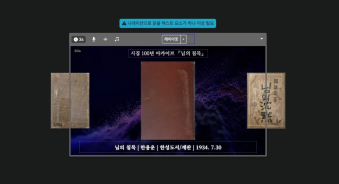
Recently, we landed a pretty big gig with our VX production service. To celebrate the opening of the Manhae Museum, we’re creating a full digital video archive ...
🎓
AI Video Creation Isn’t a Tool Problem: Where Creators Actually Get Stuck (and How to Break Through)
By the time you’ve landed on this post, you’ve probably read your fair share of “Top AI Video Tools” articles. You’ve seen everything from clip-generation servi...
🎓
Why Your Newsroom’s YouTube Channel Is Packed with Articles—but Starving for Videos
When we talk with our media clients, we hear the same thing again and again."We opened our YouTube channel two years ago, but we still don’t even have 10 videos...

Running Videostew has given us a front-row seat to the challenges faced by potential customers across all kinds of industries.
And there’s one topic that always comes up in our internal discussions: digital signage content production.
Among all channels, this is where you really need to roll out on-brand, decent-quality videos quickly and at exactly the right time. Recently, a customer came to us with a concern that fit this situation perfectly.
They operate multiple stores, and their promotions change frequently. Every time something changes, they need a new video for their digital signage—and that was becoming way too much of a burden.
Lately, we’ve been having a bit too much fun automating things with Claude Code and the Videostew Data API, so we quickly ran a test and were able to propose a concrete solution.
In this post, we’ll walk you through that entire process, step by step.
The real problem with signage isn’t making one video
As we listened to this customer’s story, it became clear: for digital signage, the real key is being able to swap in guaranteed-quality videos continuously—and fast.
There are already plenty of tools for making a single great video. These days, if you can afford the token cost, you could practically shoot a whole movie with Google Omni…
But the real bottleneck comes after that: you have to keep making new videos. Every. Single. Time. In other words, building a smooth, reliable workflow for video creation and distribution is a completely different level of challenge.
New menu videos, flash sale videos, event announcements, business hour notices… Even for just one store, the number of videos needed each month stacks up quickly. Once you add multiple locations into the mix, the number of videos you “have” to produce—tailored to each store’s situation—grows even faster.
So what this client really needed wasn’t a "better editing tool" – it was a system where you create a set of standardized templates once, then just keep swapping in new data.
First, design a single template
We started by pre‑building around ten frequently usable screen layouts. (Here, “layout” doesn’t just mean a static PowerPoint-style mockup – it includes all kinds of animations as well.)
Think of scenes where a big headline flies in over a background, a product shot with a slogan on top, a price highlight scene, or a flashy animation perfect for the intro.
Once you build a layout library like this, everything after that stops being “design work” and turns into “data work.”
For each new video, you simply give instructions to an agent like Claude Code: the agent automatically picks the right layouts, drops in the user’s images or generates new ones, and assembles the whole video. It even chooses colors, fonts, music, and sound effects on its own. (Yes, we really are living in a time where you can’t help but shout, “Long live LLMs!”)
Here’s what it looks like in practice
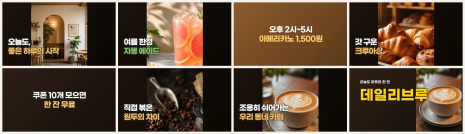
For example, it can instantly create a video that combines a photo of your store with today’s greeting message, a new product feature, promotions, and more.
All the human has to do is type something like, “Make a video with ~~ content.” in chat.
Then the LLM picks suitable layouts, inserts the necessary images, and completes the video rendering from start to finish.
These videos aren’t handcrafted one by one—they’re automatically generated from data.
Because the layout is fixed and stable, you can keep the exact same composition and copy, and just swap out the brand colors. In the example below, the left version uses a warm café-style brown, and the right version is the same screen with only the colors changed.
If your stores run multiple brands, or you like to change the tone every season, there’s no need to recreate your videos from scratch. Tweak a single place where your colors are defined, and the tone of every video updates in one go.
Want to try it yourself in Videostew?
Technically, you could skip Videostew and have an LLM call external APIs for AI voice, design the screens in HTML, and then turn everything into video with FFMPEG.
But once you actually try it, you’ll see how messy it gets—things don’t work as intended, and you end up rewriting prompts over and over (and over) again.
We may be biased—it is our product, after all—but Videostew’s edge is that you start from a template built with a clear intent, packed with guardrails and quality controls. That’s why you get the result you wanted in one shot, instead of playing prompt roulette.
And if you don’t love the result? Just jump straight into the editor and tweak it as freely as you’d edit a PowerPoint. In other words, you get the ease of an AI agent plus an interface where humans can intuitively jump in and take control.
In the past, our Data API method for injecting data wasn’t widely used because preparing JSON formats felt a bit too technical for many teams. But now that we’re in the age of agents like Claude Code, those code-related barriers are falling away—making video automation dramatically easier and far more accessible. 🚀
On top of that, Videostew is built with a clear structure from the ground up, so you get exactly the results you expect—hello, productivity boost. 🚀
If it feels a bit hard to design everything yourself in the beginning, you can leave the template creation and setup to us. Once your template is in place, running everything after that is easy: just give simple instructions on top of an automation layer like Claude code and you’re good to go.
Frequently Asked Questions
Q. I don’t know design at all. Is this still possible?
If you can make a single PowerPoint slide, you’re more than qualified. 😉 There’s nothing complicated. You just need to set labels for each element so the automation knows what to update—that’s really the only part you need to pay attention to.
Q. Can I use it for vertical digital signage screens?
Absolutely. Videostew lets you freely set your canvas aspect ratio. Ratios like 9:16 and 16:9 are available as defaults, and you can also create custom sizes for unique formats like banners.
Q. Do I have to take all the photos myself?
If you have your own photos, just drop them in. If not, you can generate them with AI, just like in this case study. You can use Videostew’s AI image generation, or run whatever generative AI you already use in your own agent workflow, grab the results, and assemble them into your video.
Q. Won’t my videos end up looking the same every time?
Because the LLM can randomly choose layouts, colors, and entrance effects, you can turn a single template into endlessly eye-catching variations.
With digital signage, the goal isn’t to perfect one video—it’s to keep swapping in fresh ones. Once you build a template and connect it to your data for automation, you can stop rebuilding videos from scratch and put that time back into running your store. If you’ve been wrestling with the same challenge, give Videostew a try!