
hhlee
2026-09-09 21:22:53
Behind
Setting Up Dev & Ops Environments for AI Agents (Without the Headache!)
🤔
Setting Up Dev & Ops Environments for AI Agents (Without the Headache!)
Here at Stew, we've set up a pretty neat environment for agent-based coding. That said, the AI world moves at breakneck speed—our own workflow gets a total make...

🤔
Before you get a quote for one AI video, ask yourself this: "How many times will I want to repeat this?"
The first message we usually get from people asking about AI video outsourcing is almost always the same. It all boils down to one question: “How much is it?” I...
🤔
In the Age When Video-Making Got Easy, Direction Is the New Superpower 🎬✨
Videostew just made a cameo on YouTube’s “Laughing Class”! 🎬Getting name-dropped alongside rock stars like Grock and ChatGPT? We’ll take it. But the real win wa...

🤔
The Video-Editing Sidekick That Slides Right Into Your Workflow: Where Videostew Is Headed
You just hit "publish" on your blog post, but the video keeps getting pushed to the mystical land of “later.” Sound familiar? I’ve lost count of how many market...

🤔
YouTube's July 15 YPP Policy Update and Three Messages I Got From It
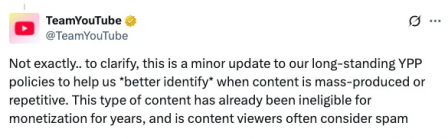
Creators in Panic ModeStarting last week, posts like "AI videos will be blocked by July 15th" and "You won't earn ad revenue unless you use your own voice" have...
🤔
Create Advertisements with Videostew (Behind the Scenes)
I'd like to share my experience of creating an English version of an advertisement video for posting on the Videostew Global channel. 🎥✨Rather than a tutorial, ...

🤔
Finding the Balance Between AI and Creativity
Between Automation and CreativityOver the past year, Videostew has focused on perfecting the 'essential editing features' that any video editing solution should...

🤔
Defending Against DDoS with AWS WAF: Focusing on User Experience
Running a website inevitably means facing abnormal traffic attacks. Especially when aiming for global services, the domain itself becomes more exposed, increasi...

Here at Stew, we've set up a pretty neat environment for agent-based coding. That said, the AI world moves at breakneck speed—our own workflow gets a total makeover every 3 to 6 months anyway—so this post might just turn into digital vintage sooner than you think. Still, we wanted to capture a snapshot of how we're building the future right here in September 2026!
The key shift? We don't treat the AI agent as just "another tool in the box." It’s now the ultimate launchpad and the final finish line for virtually everything we do. Everything from dev and testing to documentation, scoped database queries, logging, monitoring, and even customer support is wired so our AI can access and handle it. Setting up an ecosystem where the AI can be assigned tasks and orchestrate the heavy lifting has become our absolute superpower.
Remote Dev Servers & Rocking the CLI
We keep our codebase and CLI tools parked on a dedicated dev server and just SSH in from our laptops (or even phones on the go). Everything is hooked up securely via Tailscale. This means we're never chained to a single workstation—wherever we log in, our exact repository and runtime are ready to roll. Running Claude Code (aka claude) or Codex CLI (codex) right on the server lets us see live updates the second code shifts. Plus, having a 24/7 server running makes scheduling, batch jobs, and background automations ridiculously easy.
Bypass Mode: Embracing our inner "YOLO" (Responsibly!)
Skipping permission prompts to let agents run sequential commands is often dubbed "YOLO mode." When you're knocking out repetitive, low-risk chores like routine searches, test suites, or checking logs on a remote server, it's an incredible time-saver.
Of course, with great YOLO comes great responsibility. Letting an agent roam free can widen its blast radius—especially if it wanders near production setups or sensitive credentials. That's why we back it up with solid guardrails: pre-commit hooks to block sensitive files, mandatory sanity checks before touching AWS, and strictly gated Cloudflare keys. Cutting out annoying confirmation clicks doesn't mean giving an agent the keys to the kingdom without adult supervision!
Supercharging File Search with a Fuzzy Match Hook
While we might not reference files manually as often as we used to, quick file navigation is still an absolute lifesaver. In our workflow, while Codex does a decent job suggesting snappy, concise file paths, Claude's out-of-the-box file suggestions felt… let’s just say, a bit sluggish. To keep the creative momentum flowing, we hooked up a custom script to
fileSuggestioninside.claude/settings.json.This nifty script uses
git ls-filesto search only tracked files, prioritizing clean filenames and short paths. If your search query is empty, it smartly serves up your recently modified files first. The upside? You find your project assets way faster than default search. The tradeoff? Untracked files stay off the radar, and you'll needfzfinstalled along with a couple of external dependencies—totally worth it for the speed, though!Locking Down Environment Variables & Secrets (No Peeking!)
Running in bypass or full "YOLO mode" gives your AI agent broad access to your filesystem. Sure, it feels magical, but trading convenience for security can quickly turn into a horror movie. If sensitive secrets like
.envfiles slip into the chat context, they risk getting exposed. To prevent accidental leaks, we enforce a strict, two-layer security policy.Layer one is our global prompt guidelines: the agent is explicitly instructed never to read, print, or touch files like
.env, AWS credentials, Cloudflare configs, SSH private keys, or token stores. Heavy hitters like.env*,.aws/credentials,.cloudflared,.npmrc, andauth.jsonare strictly off-limits. If a value is needed, humans handle it manually; the agent only deals with non-sensitive identity checks or public resources.Here’s the catch: even with global instructions, an ambitious agent will sometimes ignore the rules if it thinks checking a
.envhelps solve the task. That's why layer two is a hard-coded blocking hook. Using the deny list in.claude/settings.jsonpaired with aPreToolUsehook viablock-credential-access.py, we inspect file reads and Bash commands in real-time. Any command trying to dump environment variables, decrypt AWS Secrets Manager, inspect Lambda configs, or runwrangler secretgets denied on the spot with a clear[CRED-GUARD]alert. Finally, we keep.claudeignoretightly configured to exclude env files, build artifacts, caches, and upload directories—cutting noise and keeping context razor-sharp.If you want to set up these environment-protecting guardrails yourself, here’s how you can prompt your AI agent.
Keep Global Instructions Lean with a Hierarchical Doc Structure
`AGENTS.md` and `CLAUDE.md` serve as the foundational playbook that your agents automatically reference depending on the tool you use. Keep your global instructions lean: include only the core tech stack, non-negotiable security protocols, coding conventions, and links to domain-specific documentation.
Over time, global instructions tend to bloat (yes, agents love adding rules to their own rulebook!). When that happens, it's time for a quick "instruction diet"—prune unnecessary guidelines and spin off topics into dedicated docs. As a rule of thumb, keep this global instruction file under 100 lines. Deep-dive details that aren't relevant to every single task belong in dedicated files inside a `docs` folder.
Here’s an example of how you might structure it:
The example above illustrates the overall concept. When working on a task that has nothing to do with payments or logging, there's no need to drag those heavy docs into the prompt context. By loading only what's essential for the task at hand, you save precious tokens (and keep your agent razor-sharp). We apply this exact same hierarchical philosophy across our broader documentation, including operational runbooks managed in separate repositories.
Pack the Go-To Skillsets
Repetitive workflows—like committing code, code reviews, opening Pull Requests, or handling Git operations—are bundled into dedicated "Skills." At Videostew, we rely on quick commands like `cm`, `rv`, `pull-request`, and `aws`. Skills do way more than just save a few keystrokes; they standardize repetitive processes and let you continuously fine-tune your workflow over time.
We build and manage our skills based on two simple rules. First, build custom only when truly needed. AI can easily over-engineer code and documentation, which is why we steer clear of generic, "do-it-all" skills found online. Instead, start minimal with just the core intent, and refine it over time by tweaking edge cases as you actually use it. Second, automate only high-frequency tasks. An overload of skills bogs down session initialization and clutters auto-recommendations. For rare but critical procedures, we simply document them in the `docs` folder instead.
At the end of the day, "skills" are just another type of document that AI agents read. Even with a simple standalone `md` file, as long as you lay out the steps and decision criteria clearly, the results won't differ much from a dedicated skill. The real difference comes down to frequency of use, discoverability, and how effortlessly you can trigger them when you're in the flow.
Integrating Infrastructure CLIs
For infrastructure management, we set things up so our AI agents can handle most queries and repetitive tasks directly. We use the AWS CLI for AWS, Wrangler for Cloudflare, and the Google Cloud CLI's `gcloud` commands for Google Cloud. By setting up the CLIs and credentials on the server, you skip the headache of clicking through maze-like back-office consoles. Just explain what you need in plain English, and the agent figures out the exact commands and steps. It can even pull traffic and billing metrics to help you review estimated costs before you hit enter.
This is an absolute lifesaver with AWS. While Cloudflare’s dashboard is sleek and intuitive, AWS is a sprawling universe of granular services where finding the right toggle can feel like a quest. Having an agent map out the relationships between services and settings saves you countless hours of digging through documentation, letting you focus on actually building great features for your users.
That said, because infrastructure directly impacts live production, safety comes first! We always enforce pre-flight check procedures within global guidelines or skill routines. The agent must verify the goal, exact changes, target resources, and blast radius before applying any real-world updates.
Development & Production Logging Systems
Logs are a developer's best friend—vital for debugging during development, and essential for monitoring, metrics, and customer support in production.
On dev environments, there’s no need to blast logs externally, so we keep things clean by saving backend and frontend logs to local files. On the frontend, we hook into browser `console` methods and route them to a dedicated logging endpoint that writes to a file. The backend sticks to the framework's native logging path. This lets our AI agent inspect runtime logs firsthand during testing and patch issues on the fly—saving developers the tedious routine of copying and pasting console errors!
Behind the scenes of our online AI video editor, seamless rendering depends on airtight observability. On our production servers, client-side glitches are piped through a dedicated pipeline straight into a collection layer like AWS Lambda and saved in CloudWatch. Meanwhile, backend framework errors stream into CloudWatch Logs via syslog and lightweight log agents. We carefully document where each log type lands in CloudWatch and how to query it—keeping our global guides crystal clear so no mystery bug steals the spotlight.
Here’s why this workflow is a game-changer:
By centralizing error logs in CloudWatch, you can search everything in one unified way—even when your architecture is split across multiple servers, microservices, and Lambda workers handling heavy video pipelines. Even if different services use distinct logging formats and call stacks, a single source of truth makes tracing issues a breeze. It enables AI coding agents (and humans!) to pinpoint the exact root cause and match it against the right code snippet in seconds.
Syncing Like a Pro with GitHub Issues
When collaborating with AI agents during development, things can branch out faster than a multi-track video timeline. While digging into Issue A, you inevitably bump into hidden quirks, prerequisite bugs, or tasks that need follow-up log verification after deployment. That’s where we let GitHub Issues take center stage.
To make tracking effortless, we set up a dedicated GitHub Issue skill (like
/issue). Whenever a side quest pops up mid-code, we trigger this skill to spin off a spin-off issue on the fly, then immediately get back to cracking the original Issue A. Nothing gets lost in the cutting room, and every edge case stays on our radar. Staying laser-focused on one problem at a time also keeps your agent’s context window lean—saving precious tokens along the way.Let’s be honest: many real-world video editing bugs don't show up in code alone. They only surface when real user media and dynamic databases collide. Dummy test clips can easily hide subtle flaws, and if an issue doesn't throw a full-blown error, it might stay buried forever. Our fix? Once development wraps up, we create a
watchissue—or add an observation phase to the current ticket—with a clear monitoring window and review date. By putting aDue:tag on the very first line alongside smart labels, tracking verification milestones is smooth sailing. When review day comes, we simply say, “Let’s check the issues past their observation window,” review real-world metrics, and confidently confirm whether the fix is truly rock-solid or needs one final polish.Base Models and Auto-Escalation: How We Work Smart (and Save Cash)
Confession time: as a scrappy, budget-conscious startup, we can't just throw the most expensive, ultra-high-IQ models at every single problem 24/7. So, we're obsessed with squeezing every drop of efficiency out of our AI stack. When you look at daily coding and operations, a surprising amount of work boils down to simple, routine requests: "check this," "verify that," or quick status sweeps. Even before tackling heavy lifting, we often do repetitive, lightweight scouting just to get the lay of the land. Taking all that into account, we set a cost-effective mid-tier model as our daily driver (think Claude Sonnet, or Luna/Terra for Codex).
Here’s the secret sauce: through our global instructions, we teach the base model to automatically call in a heavyweight model as a sub-agent when things get gnarly (Claude Opus or Fable; Sol High for Codex). This turns our base model into a smart, cost-aware router—giving us the best balance of speed, cost, and raw brainpower for every situation.
Delegating works like this: the base model hands off scope analysis and architectural planning to the high-tier sub-agent. Once the sub-agent returns a bulletproof blueprint, the base model gets its hands dirty writing the actual code. Is it flawless? Not quite. You can hit minor bottlenecks during the handoff, and occasionally the base model stubbornly tries to solve a high-level riddle itself—and ends up making a bit of a mess.
The fix? Clear ground rules. In the global prompt, instruct the agent to escalate immediately when it spots heavy-duty challenges, security/auth tasks, or DB schema changes—or if a task starts dragging out and ballooning in scope. Keep the roles crystal clear: the main agent handles context injection, delegation, coding, and testing, while the sub-agent focuses strictly on high-level planning. Escalation triggers will vary from project to project, so fine-tune those thresholds as you test what works best for your team.
※ Fun tip for Claude users: there's an unlisted model called 'opusplan' that lets you split execution and planning models effortlessly between standard runs and planning mode.
※ Of course, when we know a task is a monster from minute one, we skip the middleman and go straight to the heavy-hitter.
Connecting Our Operations Manual
Refund policies, refund checklists, account rules, the absolute minimum survival guide for daily operations... internal manuals can grow into absolute monsters. Plus, they need constant updates every time a wild new edge case appears! Because everyone on the team touches this knowledge base, having a clear version history without messy merge conflicts is a non-negotiable must.
We solve this by hosting our operations manual in its own dedicated Git repository as a fleet of clean Markdown (.md) files. The primary entry point—the humble README.md—acts as a master directory guiding you to exactly what each file covers. By authenticating this repo via standard Git CLI or Git MCP and wiring it up as an AI skill (`/manual`), our agents can look up guidelines or push updates on the fly anytime.
※ Hierarchical doc architecture is our bread and butter—used across general instructions and operational manuals alike. It saves precious tokens while keeping workflows snappy and efficient!
A Few Extra Pro-Tips from the Trenches
--
That wraps up a quick look under the hood at how we build and run things agent-first! For anything we skipped over today, stay tuned—we'll dive deeper into those topics in upcoming posts.