
Junwoo
2025-05-22 15:25:02
Announcement
[Update] AI Image Generation Style Selection Feature Added
🗞️
[Update] From Generating Images to Remixing and Video Creation—All in One Place!
Just double-click any image in the editor, and boom! You can now jump straight into four powerful AI actions.Create a completely fresh image based on your slide...
![[Update] From Generating Images to Remixing and Video Creation—All in One Place!](https://cdn.videostew.com/files/thumb/980c7babf-7x4chx14a)
🗞️
[Update] Give Stock and Uploaded Photos an AI Makeover with 'Generative Edit'
You can now refine and reuse the images you already have—no need to toss them out and start over. With the newly added 'Generate Edit' feature, the image curren...
![[Update] Give Stock and Uploaded Photos an AI Makeover with 'Generative Edit'](https://cdn.videostew.com/files/thumb/274c0ca30-7wwu05ktr)
🗞️
[Update] Instantly generate multiple slides with AI right from the slide editor ✨
You can now generate AI content for multiple slides directly in the Videostew editor. Just pick the element you’re editing, choose whether you want an image, vi...
![[Update] Instantly generate multiple slides with AI right from the slide editor ✨](https://cdn.videostew.com/files/thumb/f72020c7f-7vp6h1rc0)
🗞️
[Update] Effortless Video Creation with Just an Account API Token – No SDK Needed
What’s NewPreviously, using the Automation API meant you had to go through the hassle of creating a separate SDK. Now, you can jump straight into auto-generatin...
![[Update] Effortless Video Creation with Just an Account API Token – No SDK Needed](https://cdn.videostew.com/files/thumb/9a371f670-7vcfraxg8)
🗞️
[Update] AI Video Clip Generation Feature
You can now generate AI video clips in Videostew using nothing but a text prompt.In your Library, go to the Visual tab, choose the AI Video category, then click...
![[Update] AI Video Clip Generation Feature](https://cdn.videostew.com/files/thumb/a0de300fe-7vbjxvbd6)
🗞️
[Update] Large File Uploads for Your Videos
Videostew now lets you upload large video files up to 1GB.Previously, you were limited to 250MB per upload, so you had to manually split your video into smaller...
![[Update] Large File Uploads for Your Videos](https://cdn.videostew.com/files/thumb/36cb53236-7v6dmsmeg)
🗞️
[Update] Create Podcast-Style Videos in a Snap
A new writing style, the Podcast Format, has just been added to Videostew.When you select the podcast format in either [Start from an idea] or in Polishing mode...
![[Update] Create Podcast-Style Videos in a Snap](https://cdn.videostew.com/files/thumb/133403bd4-7v2jle8ng)
🗞️
If You’re a Media Company, Don’t Miss This 2026 Public Infrastructure Support Project: How to Use NewsTTV/News Images for Free
The Korea Press Foundation has opened applications for its 2026 News Content Shared Infrastructure Support Program. The application deadline is Wednesday, April...
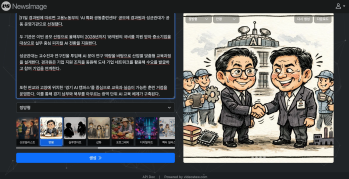

You can now generate a variety of illustrations in the AI Image Generation feature under the illustration category.
(Image generation feature is available for Personal Plan users and above.)Examples of Each Style
Illustration
Using the SDXL model, this style is characterized by watercolor-like backgrounds and strong pencil sketch lines.
Vector
Utilizing OpenAI's image generation model, it creates images in the vector style famously used by GPT.
Silhouette
Employing the SDXL model, this style generates silhouette illustrations focused on people.
Videostew's AI Image Generation feature stands out by automatically creating images that perfectly match the script you've written, eliminating the need to brainstorm prompts for image creation.