Guide
AI 비디오 생성하기
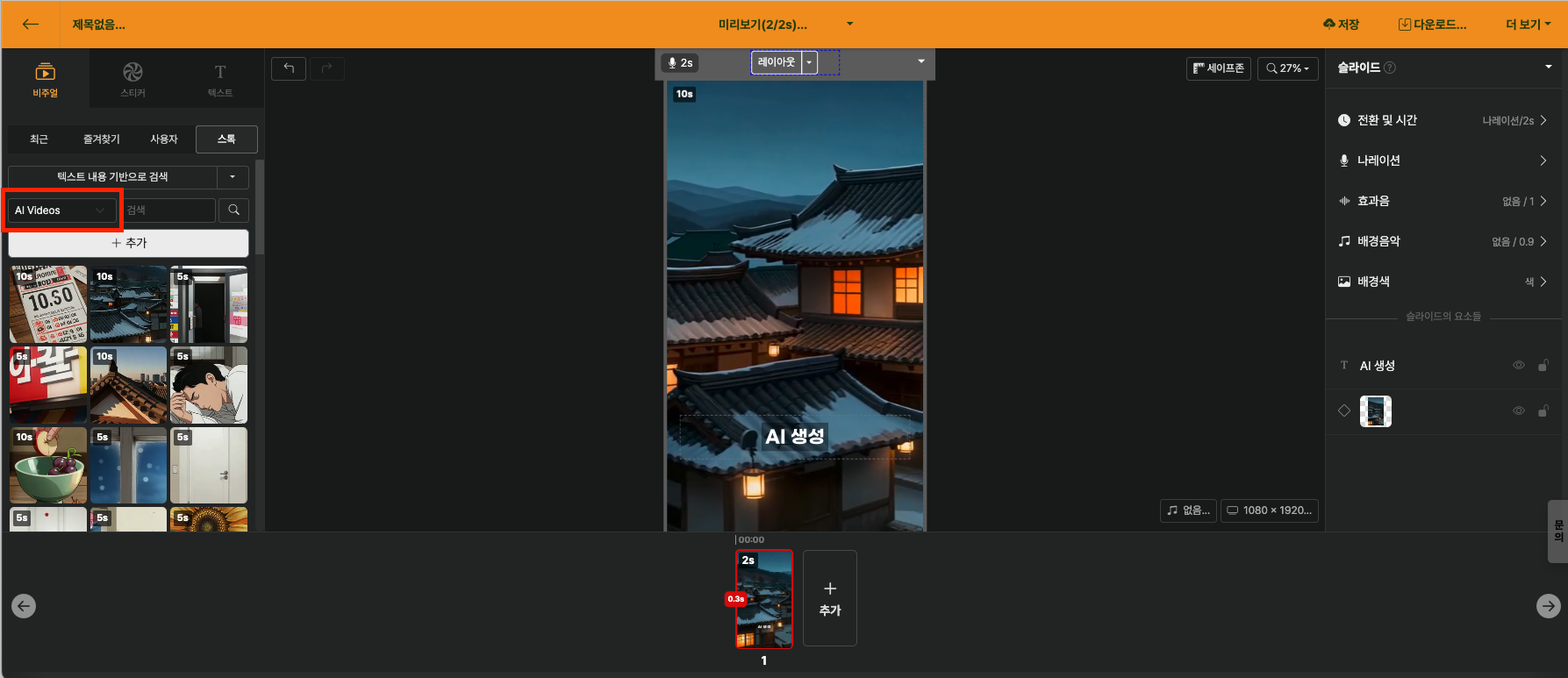
Videostew provides an AI video generation feature that automatically creates short videos suitable for scenes based on the content entered in slides, just like AI images. Without separate video filming or prompt writing, it naturally visualizes the content on screen as-is.
Selecting AI Video Category
Select AI Video from the Visual tab in the library, just like AI images. If there is subtitle text entered in the slide, it is automatically brought in and used as the basis for video generation.
Adding AI Video
Clicking the + Add button automatically generates a video that suits the slide content using AI. Even if you don't know prompts, Videostew naturally compensates for prompts on its own to create natural videos, so anyone can use it easily. However, video generation takes longer than image generation, and 500 credits are consumed per generation.
You can continue other editing work while generation is in progress, and when the video is complete, you will be notified with a real-time notification.
Videos generated by Videostew are added to a public library where anyone can search and reuse them, under the same policy as AI images. For more details, please refer to the AI Image Copyright guide document.
Turn existing images into video
You can also turn images placed on slides directly into moving videos. Double-click the image and select Turn into video.
Motion description is optional. You can write the desired motion like "slowly zoom in", or leave it blank for natural motion that maintains the original proportions to be automatically applied. You don't have to write how it moves every time.

< The Motion Input Card is optional >
The resolution defaults to 720p, and the credits required for generation are displayed together with the Generate video button.
