Guide
User
Editing screen > Left sidebar library > My uploads tab
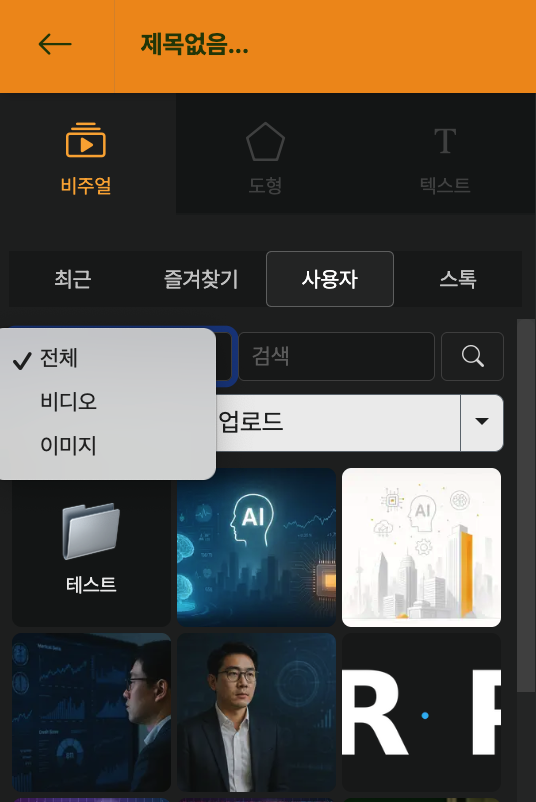
This is the live library of elements uploaded directly by the user. You can add images or video files by dragging them onto the screen from the explorer or by clicking the Upload button. (If you drag and drop files into the live Library Window, they are not entered on the stage but only added to the list.)
Users can also find recently uploaded resources more easily through category filtering. If the uploaded list does not appear after upload, please check whether this category setting has been applied by default.
| Category | Description |
|---|---|
| All | Shows all resources uploaded by users |
| Video | Shows only video files among uploaded files |
| Image | Shows only image files among uploaded files |
Organize by Library Folder
Edit Screen > Library Window on the left > User Tab
The library folder is a place to organize "assets" such as logo·intro/outro·B-roll·background music.
In the User tab of the library, you can group all the resources you uploaded by folder.
- In the edit screen, open the [Library] window on the left and select the User tab.
- After adding a new folder at the top of the User tab, name it according to your purpose.
- Example:
Brand / 로고·CI,B-roll / 오피스,인트로·아웃트로,세로 쇼폼 전용 리소스etc.
- For individual resources,
- You can drag and drop cards (thumbnails) to move them between folders
- After selecting multiple items with long click/multiple selection, you can move them all at once to another folder.
- Through the settings (▼) menu above the folder, you can perform basic management such as renaming or deleting.
Because folders can be managed by workspace,
- You can upload frequently used logos or images just once
- And use them directly from the library without re-uploading for each project
You can use it like “My Brand Asset Storage”.
Delete uploaded resources all at once
If you hover the mouse over a resource, a settings button appears. Here, you can click "Select Multiple" and define the range by pressing the `SHIFT` key to select multiple items at once.Please proceed with the deletion through the trash can icon at the top right. However, if the resources have already been used in another project, please be careful when you wish to edit that project again as the elements may not load properly.
