Guide
- Can I try the experience before paying?
- Can I receive a proposal and service introduction?
- How do I add a coupon?
- I logged in with my Naver ID but I haven't received the verification email!
- How do I unsubscribe?
- Is there a discount available for educational purposes?
- Can I receive a tax invoice?
- I want to cancel my payment.
- Wondering how the pricing works?
- How can I check how much credit time I used?
- What is video rendering?
- Although the subscription has been renewed, the credit usage has not been initialized
- Are there any events/promotions where I can get free usage rights?
Account and Payment Information
Can I try the experience before paying?
It’s free. When you sign up for Videostew, you can try it free for 14 days. In addition, if you participate in the Online Class, we provide 1 month of free usage rights (Personal Plan) for learning how to use Videostew.
Furthermore, content produced in the trial version can be freely distributed on the channel of your choice, according to the terms of Videostew.
Can I receive a proposal and service introduction?
Yes, you can. In the case of a proposal, you can directly specify the plan and period at the online proposal and receive it.
You can also download the service introduction by clicking here.
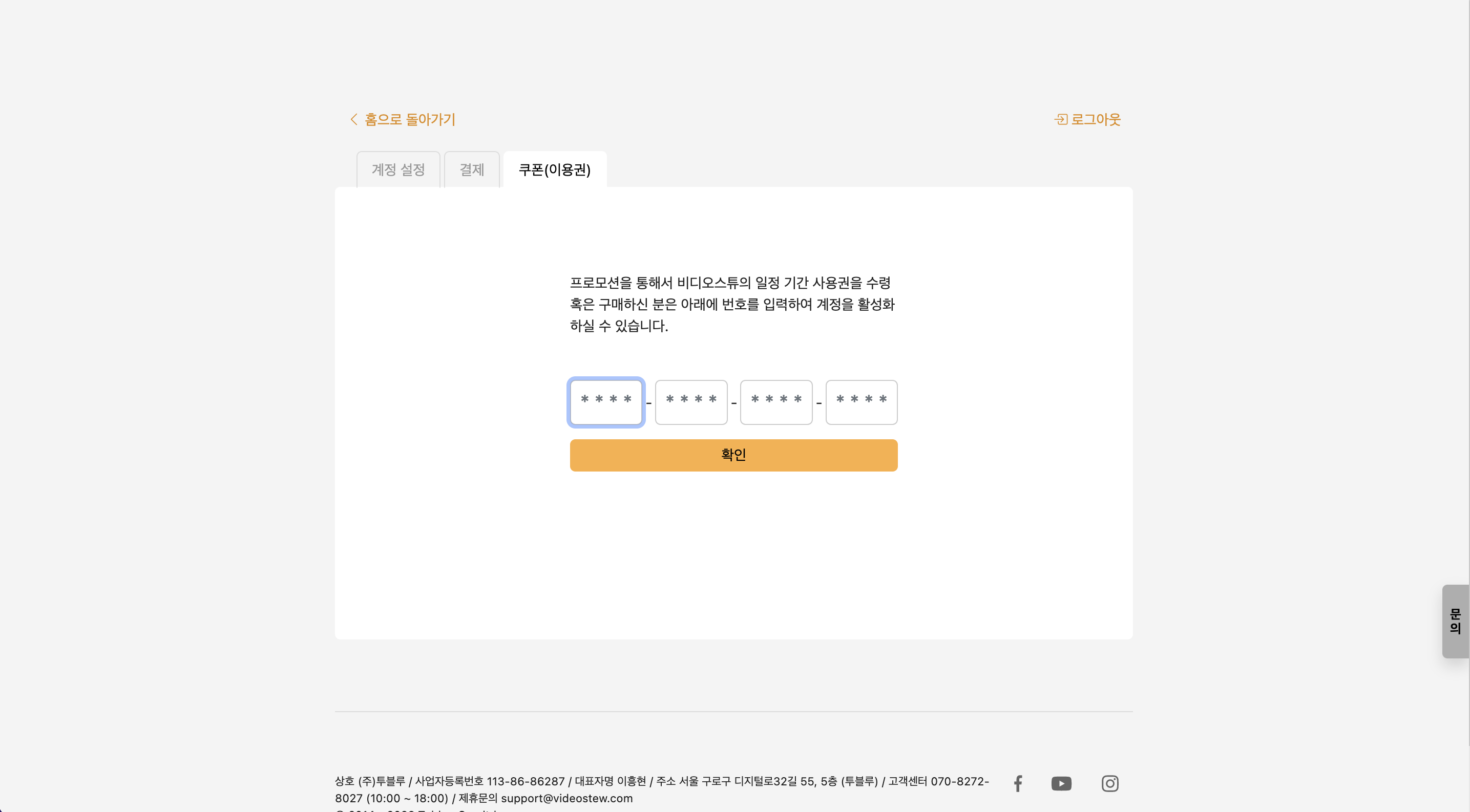
How do I add a coupon?
If you have received a coupon (voucher), you can add it via the Account and Payment > Coupon menu. Coupons are applicable only once per new account.
I logged in with my Naver ID but I haven't received the verification email!
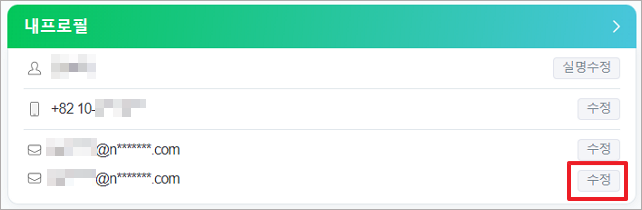
When logging in with a Naver ID, a mail is sent to the 'contact email' instead of the Naver email address. Therefore, if you update your 'contact email', you can request the verification email again. For more detailed information, please check the link at Naver Customer Center.
- Log in to Naver.
- Click on the NaverID button in the login area.
- In the profile area, click on the button to edit the verification email on the right.
How do I unsubscribe?
To unsubscribe, please proceed by going to Home Screen > Upper Right Account Profile > Account and Payment > Unsubscribe. The direct link is as follows.
Is there a discount available for educational purposes?
Yes! We offer specially priced educational plans based on the usage purpose and the number of required accounts. Please inquire through Contact Us.
Can I receive a tax invoice?
All payments are processed online through card payment transactions as the default payment method. It is possible to receive a cost breakdown and handle tax matters via card statements. However, if you specifically need a tax invoice, please request it separately, and the payment will be processed through account transfer.
I want to cancel my payment.
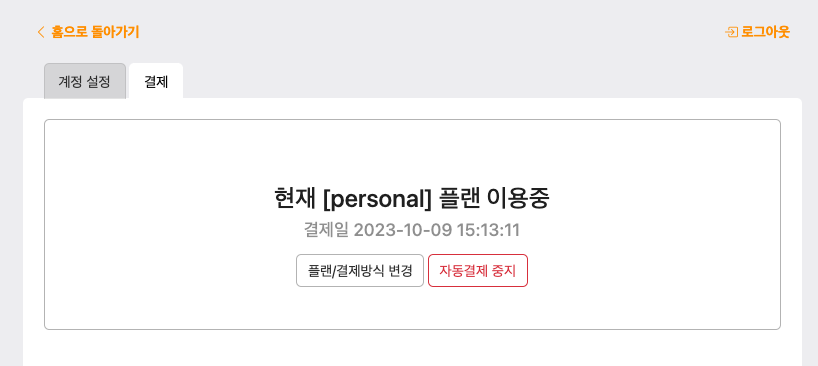
If your monthly auto-payment is currently in progress, you can cancel the subscription at any time, and no further recurring charges will occur after the current period ends.
Home screen > Account Click (Top right corner) > Account and Payment > Payment tab
Wondering how the pricing works?
Pricing information is provided on the Pricing Page, and you can compare the features offered for each plan in detail through the feature comparison table.
| Plan | Personal | Pro | Creator | Brand-10 | Brand-20 | Brand-30 |
|---|---|---|---|---|---|---|
| Credits | 30,000 Credits | 60,000 Credits | 90,000 Credits | 180,000 Credits | 360,000 Credits | 540,000 Credits |
| Max length per video | 10 min | 10 min | 15 min | 20 min | 20 min | 20 min |
| Max quality | FHD | FHD | FHD | FHD | FHD | FHD |
| Storage capacity | 10GB | 20GB | 50GB | 100GB | 150GB | 200GB |
| Brand Workspace | - | - | 10 items | 10 items | 20 items | 30 items |
| Voice cloning | - | ✅ | ✅ | ✅ | ✅ | ✅ |
| AI visual generation | ✅ | ✅ | ✅ | ✅ | ✅ | ✅ |
| Team member invitation | - | - | 2 people | 10 people | 20 people | 30 people |
| AI Voices | 1,500 items | 1,500 items | 1,500 items | 1,500 items | 1,500 items | 1,500 items |
| Stock library | 10 million | 10 million | 10 million | 10 million | 10 million | 10 million |
| Background music/effects | 50 thousand | 50 thousand | 50 thousand | 50 thousand | 50 thousand | 50 thousand |
| Customer support | Online chat | Chat | Chat | Chat/Phone/Video meeting | Chat/Phone/Video meeting | Chat/Phone/Video meeting |
| Brand template creation | - | - | - | ✅ | ✅ | ✅ |
How can I check how much credit time I used?
Click the nickname on the video download pop-up or home screen to see the remaining credit time.Check credit usage in the video download menu
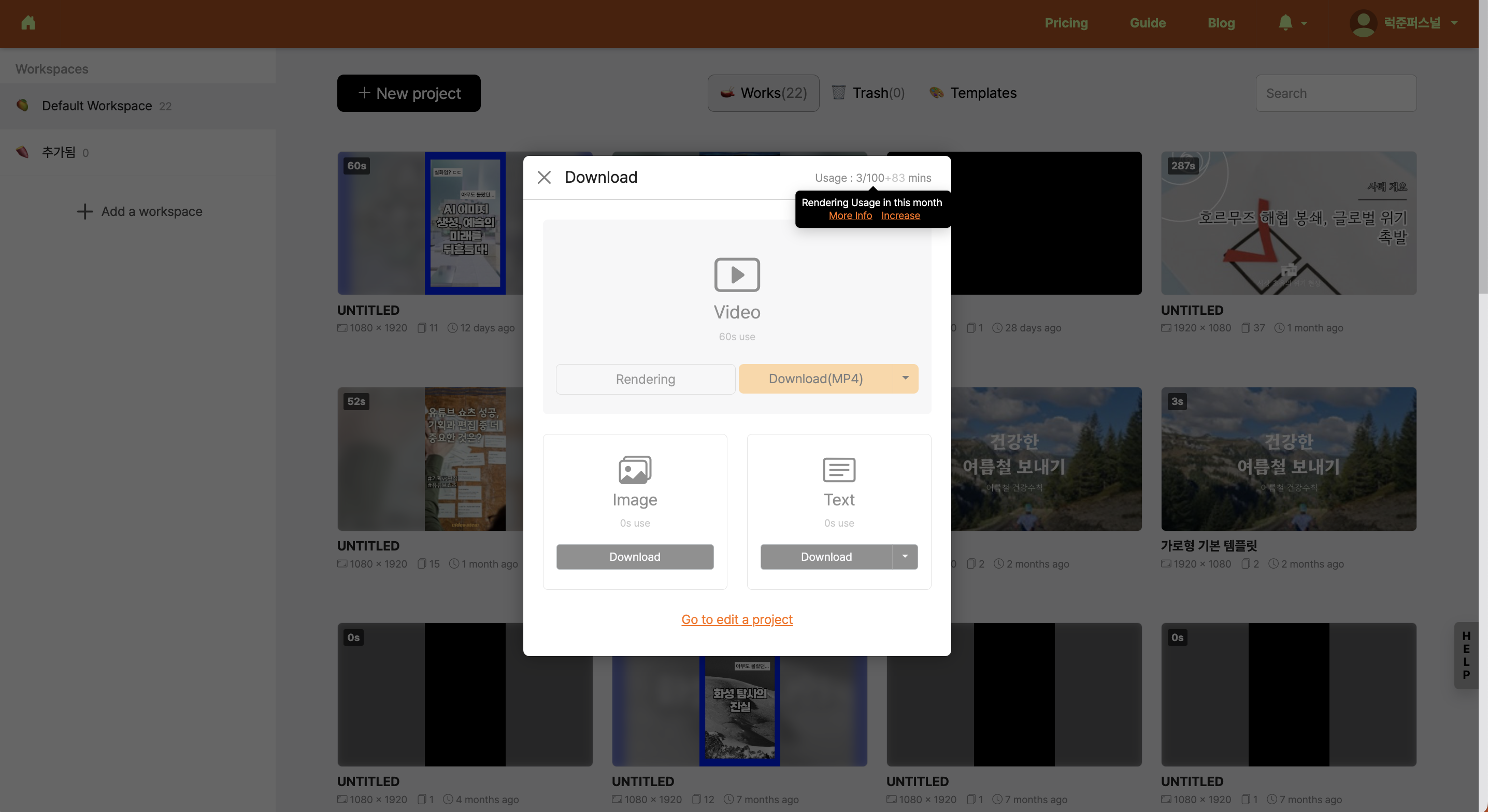
Videostew renews credits on the 1st of each month and provides the total credit information available for that month. Also, unused credits from the previous month (indicated with '+number') can be carried over and used.
Check nickname creation time in the usage summary
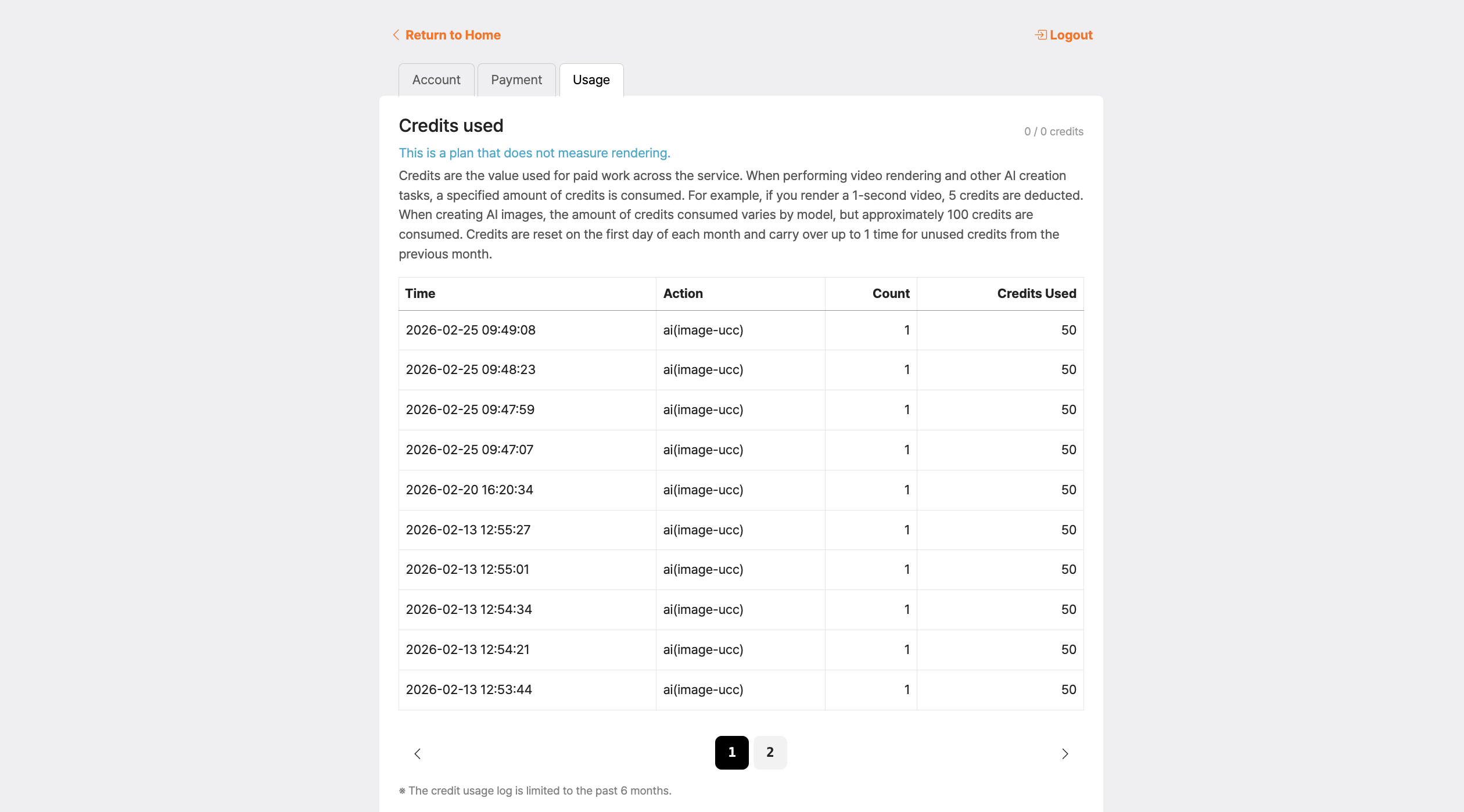
Click your nickname on the home screen and check your credit usage status in [Account & Billing > Usage Summary].
Remaining credits are displayed in red
The remaining credit number turning red is a signal that you have used more than 80% of your total credits available this month (base credits + monthly credits), leaving very few credits.
- If you see red, it means your remaining credits have dropped below 20%. If you wish to continue working, please consider upgrading your plan.
- Monthly credits (displayed as '+number') are used after all base credits are consumed, and they expire at the end of this month without rolling over to the next month.
What is video rendering?
Once the job is finished, cloud-server rendering is performed to generate the video file. Each plan has a monthly allowance; for example, rendering one 1-minute video consumes 300 credits.
Although the subscription has been renewed, the credit usage has not been initialized
Rendering credits
Rendering credits are reset on the 1st of every month, regardless of your billing date. This policy is more generous to users because it allows them to write off both the maximum usage of the month when the subscription starts and the maximum usage of the month when it ends.
We also run this monthly policy for a consistent user experience. For example, if you have unused credits last month, they are all written off first and then topped up with new credits this month. The month is based only on the unused portion of the previous month, and there is no order to exceed the current plan’s maximum credits. (If you downgrade the plan after the month has passed, the credits that exceed the maximum for that plan are not carried over.)
This monthly credit can be used only after all basic credits have been used up. If you use only the basic credits or less, the monthly amount will expire at the end of that month and will not carry over to the next month.
What happens if I exceed the plan’s rendering credits during the subscription period?
Videostew supports free plan upgrades and downgrades. For example, if you run out of credits during a Personal plan subscription, you can upgrade to a higher plan from the billing menu.
At this time, the remaining amount is calculated based on the next billing date of the personal plan, and only the difference for the higher plan is charged additionally.
If the subscription date is the 1st of every month, and the upgrade is made on the 15th, 50% of the previous plan will be deducted and only 50% of the upper plan will be charged
During the subscription, a downgrade to a lower plan is also possible. In this case, the remaining period of the new plan will be charged, and the amount for the remaining period of the existing plan will be refunded.
On the checkout page, select an upper-tier (or lower-tier) plan and proceed with the payment; the refundable amount and the amount that will actually be charged are displayed, so please confirm and complete the payment.
Storage Capacity
Storage capacity is permanently accumulated per account. If you exceed the limit of your plan, you need to upgrade your plan or regularly clean up unused storage.
To check your storage capacity, you can confirm it by going to Home > Top right corner > Profile button > Account and Payment > Usage tab.
Are there any events/promotions where I can get free usage rights?
Videostew is running a promotion where you can get 1 month of personal plan usage rights for free. Please check the details for the current promotions below.
Get 1 month free usage by leaving a Videostew review
If you leave a review content containing your feedback on Videostew on SNS, you can receive a one-month free usage right. The review post must be written in detail and directly by you; automatically generated review posts using GPT, etc., cannot participate in the event. (Well-written review posts or review posts posted on your own domain are provided with a two-month usage right through internal screening.)If you have a link to content you created directly, please include screenshots of the editing screen, etc.
Next are the instructions for participating in the review event.
- Subscribe to the Videostew YouTube channel
- Videostew 온라인 클래스 강의 영상 시청하기
- Leave a review of using Videostew on your blog or other owned channels (include lecture video address and Videostew site address): No need for text posting; you can post on all SNS such as YouTube or Facebook. However, if you post review content on a domain you own, we will provide an additional one month usage right.
- Leave the review URL with Videostew's 문의 and receive a 1-month access pass
